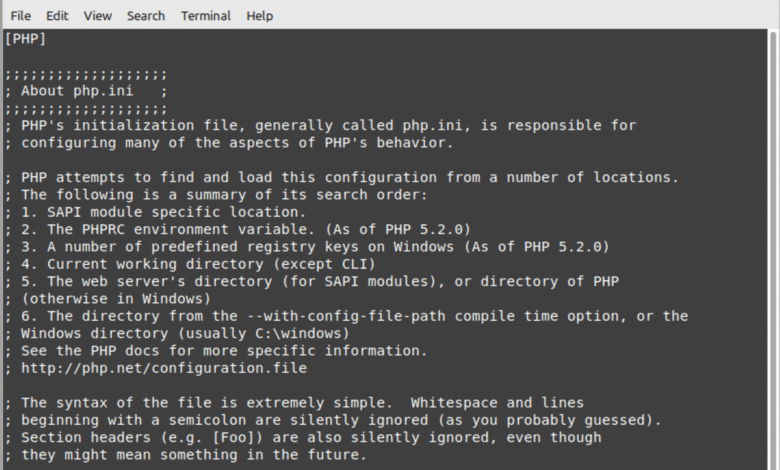
Understanding where is php.ini file located is crucial for anyone working with PHP-based websites or applications. The php.ini file is the main configuration file for PHP, controlling essential settings such as memory limits, file upload sizes, and error reporting. Knowing where is php.ini file allows developers and administrators to optimize server performance, troubleshoot errors, and ensure compatibility with applications like WordPress, Laravel, and local development stacks such as XAMPP or MAMP.

The location of the php.ini file can vary depending on the operating system, PHP version, and server environment. Many hosting providers, including HostGator, iPage, and InMotion, provide access to php.ini through cPanel or other control panels. For developers, knowing where is php.ini file ensures they can make precise adjustments to PHP settings without disrupting their website or application functionality.
Understanding php.ini File
The php.ini file is a critical component of PHP that determines how the scripting language behaves on a server. It defines configurations such as memory allocation, maximum execution time, and upload limits. Without the php.ini file, PHP would operate on default settings, which may not suit high-performance websites or specialized applications. Knowing where is php.ini file helps administrators customize these settings according to their server needs.
Modifying the php.ini file allows developers to resolve issues, improve website speed, and enable PHP extensions required by various applications. Whether you are managing a WordPress site, Laravel project, or running local development environments like MAMP or XAMPP, identifying where is php.ini file ensures that changes are applied correctly, preventing errors or downtime.
How to Find php.ini File on Different Operating Systems
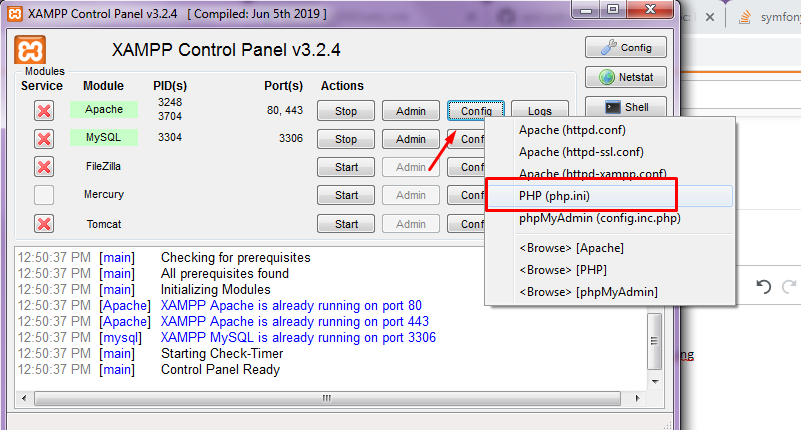
On Windows, the php.ini file is usually located in the PHP installation directory or within XAMPP or WAMP folders. For XAMPP, the path is typically C:\xampp\php\php.ini, while WAMP provides access through its control panel. Another reliable method is creating a phpinfo.php file in your website’s root directory to display the loaded configuration file path. This is one of the most accurate ways to determine where is php.ini file currently in use.
Linux and Ubuntu users can often find the php.ini file in /etc/php/<version>/apache2/php.ini or /etc/php.ini. Command-line tools such as php --ini or php -i | grep "Loaded Configuration File" are useful for quickly locating the active file. CentOS, Fedora, and other distributions may have slight variations in paths, making it important to verify where is php.ini file before making any modifications.
Finding php.ini File in Web Applications
For WordPress users, locating where is php.ini file is essential for performance optimization and troubleshooting. The simplest approach is to create a phpinfo.php file in the root directory of your WordPress installation. This displays the active php.ini path used by your server. Hosting providers such as HostGator, iPage, and InMotion often allow users to modify php.ini settings via cPanel or similar interfaces.
Laravel projects also rely on the system PHP configuration. Knowing where is php.ini file on your local development stack or server is critical to prevent errors related to memory limits, execution time, or file uploads. MAMP, XAMPP, and local Linux servers each have distinct php.ini paths, so confirming the correct location ensures your Laravel applications run smoothly without interruption.
Editing php.ini File Safely
Before editing the php.ini file, it’s important to create a backup to prevent accidental server issues. Recommended editors include VS Code, Notepad++, nano, and vim, which allow you to modify the file safely. Key settings often adjusted include memory_limit, upload_max_filesize, and max_execution_time. Editing the php.ini file carefully ensures that PHP operates efficiently while avoiding common errors.
After making changes to the php.ini file, it is necessary to restart the web server or PHP-FPM service. This guarantees that all modifications take effect. Knowing where is php.ini file and editing it responsibly helps developers maintain site performance and security. Whether you are managing WordPress, Laravel, or a custom PHP application, proper handling of php.ini is essential.
Troubleshooting php.ini File Issues
Sometimes the php.ini file may not be found, or multiple copies can create conflicts. In such cases, .user.ini or .htaccess overrides can temporarily apply the necessary configuration changes. Ensuring you have the correct file permissions on Linux or macOS servers is also critical. Knowing where is php.ini file enables smooth troubleshooting and prevents configuration errors.
If changes to the php.ini file do not seem to apply, it may be due to using a different php.ini than expected. Using phpinfo() or command-line tools helps identify the active file. This step is particularly useful when managing WordPress, Laravel, or shared hosting environments, ensuring that all PHP settings are applied correctly and consistently.
Conclusion
Understanding where is php.ini file is essential for web developers, administrators, and anyone managing PHP-based applications. From Windows and Linux servers to WordPress, Laravel, MAMP, XAMPP, and hosting platforms like HostGator, iPage, or InMotion, locating and editing php.ini ensures optimal performance, stability, and security. Regularly reviewing and updating the php.ini file allows your PHP applications to run efficiently and reliably.